
Building a solid business website used to mean a complex process involving various individuals and transitions: the strategist, the designer, the developer, the copywriter, and the project manager who managed all those. It took weeks, even months, and was costly.
In 2027, however, a small entrepreneur can just describe their product, fill out several forms, and have a basic version of a website designed within an hour. This is the most apparent result of AI-driven website design, but far from the only one. The key thing here is that the whole website development process is being revolutionized – from the planning phase to testing, personalization, and maintenance.
Here, I will cover the actual changes, the myths, and how to apply AI to your website design without ending up with something generic.
What “AI-Powered Website Design” Really Means
The phrase gets thrown around loosely, so let’s pin it down. AI-powered website design means using machine learning and generative tools at one or more stages of building and running a website. That can include:
- Generating layouts, color palettes, and page structures from a short prompt
- Writing or rewriting copy, headlines, and product descriptions
- Creating and editing images
- Suggesting UX improvements based on how visitors behave
- Personalizing content for different visitors
- Running chat assistants that answer customer questions
- Checking accessibility, speed, and SEO problems automatically
Some of these are mature and reliable. Others still need a lot of supervision. Knowing which is which saves you money and embarrassment.
From Weeks to Hours: Faster Site Building
The biggest practical change is speed. Modern AI website builders can produce a multi-page site with a home page, services, about, contact, and a basic blog from a plain-English brief. They pick a layout, suggest section order, draft placeholder copy, and pull in images that roughly match your industry.
For a local plumber, a freelance photographer, or a new online shop, this is a big deal. The barrier to getting online has basically disappeared. You no longer need to hire a developer just to have something presentable.
For agencies and in-house teams, the gain is different. AI handles the blank-page problem. Instead of starting every project from scratch, a designer can generate three or four rough directions in minutes, throw away the weak ones, and spend their time refining the strong one. Wireframing, which used to eat days, now takes hours.
The catch is that a fast first draft is still a first draft. AI tends to produce competent, average results. If you ship what it gives you without changes, your site will look and sound a lot like thousands of others. Speed is the advantage. Distinctiveness still has to come from you.
Personalization That Actually Works
Website personalization isn’t new, but it used to be clunky and expensive, mostly reserved for large retailers with big data teams. AI has made it accessible to ordinary businesses.
Here’s what that looks like in practice:
- Different headlines for different visitors. Someone arriving from a “budget laptop” search sees pricing-focused messaging, while a returning customer sees new arrivals.
- Smarter product recommendations. Instead of “bestsellers” for everyone, the site shows items based on what the visitor has viewed.
- Adaptive layouts. If most mobile visitors tap the phone number, the site moves it higher on mobile screens.
- Location-aware content. Opening hours, delivery options, and service areas adjust automatically.
Done well, this feels helpful, not creepy. Done badly, it feels like being followed around a shop by an overeager assistant. The line is usually about relevance and transparency. Use personalization to save people time, not to manipulate them.
Privacy rules matter here too. Regulations around data and consent keep tightening in many regions, so any personalization setup should rely on data your visitors have agreed to share. Check how your tools collect and store information before you switch anything on.
Smarter UX Design Through Behavior Data
Good UX design has always depended on watching what people actually do, not what designers assume they’ll do. AI has made that watching much easier.
Instead of exporting heatmaps and squinting at them, you can now get plain-language summaries: “Visitors on mobile are scrolling past your pricing table without interacting with it,” or “Forty percent of people abandon the checkout form at the phone number field.” Some tools go a step further and propose fixes, such as shortening the form, changing a button label, or moving a trust badge closer to the payment step.
AI-assisted A/B testing is also more practical now. Rather than testing one change at a time over several weeks, tools can run many variations at once and shift traffic toward whichever performs better. For businesses with modest traffic, this still takes patience, because small sites don’t generate enough data for fast conclusions. But the tooling is far less intimidating than it was.
The important thing is to treat these suggestions as hypotheses, not instructions. AI spots patterns. It doesn’t know your brand, your customers’ mood, or the reason behind a behavior. A drop-off on a page might mean the page is bad, or it might mean people found what they needed and left happy.
AI and SEO: Helpful, but Don’t Cut Corners
SEO is where many businesses get tempted into mistakes. AI makes it easy to produce huge volumes of content, and some site owners have responded by publishing hundreds of thin, generic pages hoping to rank.
That approach has aged badly. Search engines have become much better at spotting content that exists only to fill space, and they continue to favor pages that show real experience, accuracy, and usefulness. Publishing mass-produced filler is more likely to hurt your site than help it.
Where AI does help SEO, legitimately:
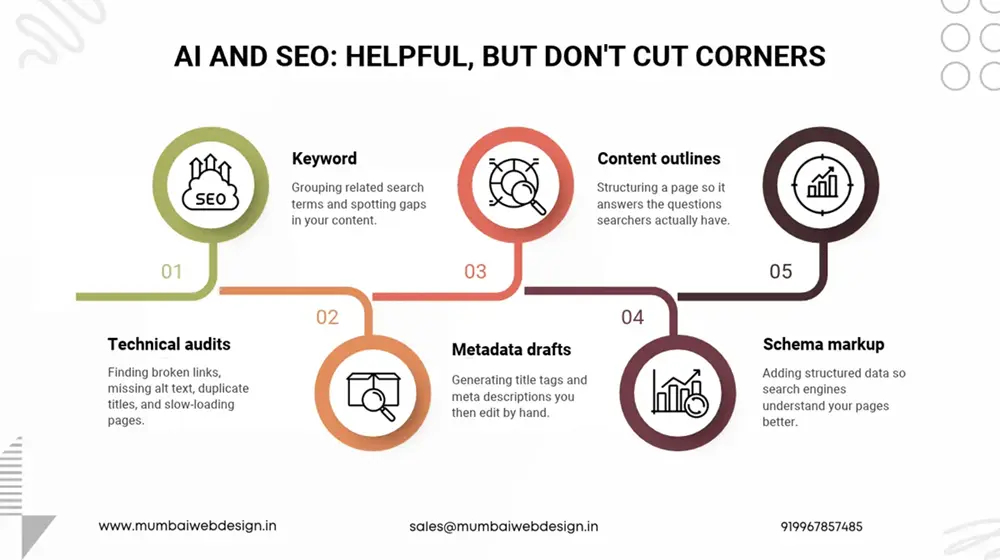
- Keyword and topic research. Grouping related search terms and spotting gaps in your content.
- Technical audits. Finding broken links, missing alt text, duplicate titles, and slow-loading pages.
- Content outlines. Structuring a page so it answers the questions searchers actually have.
- Metadata drafts. Generating title tags and meta descriptions you then edit by hand.
- Schema markup. Adding structured data so search engines understand your pages better.
The best workflow is simple: use AI to research and organize, then have a real person with real knowledge write or heavily edit the final content. Add your own examples, your own opinions, photos you took yourself, and details only someone in your business would know. That’s what separates a page worth ranking from a page that merely exists.
Search itself is also changing. More people get answers directly from AI-generated summaries without clicking through. That makes clear, well-structured, trustworthy content even more valuable, since it’s what those systems tend to pull from. Answer questions directly, use sensible headings, and make sure your business details are accurate everywhere they appear online.
Chatbots and Virtual Assistants Have Grown Up
Website chatbots used to be frustrating. They matched keywords, gave canned answers, and trapped people in loops. The newer generation is noticeably better. Modern AI assistants can read your actual product pages, policies, and FAQs, then answer questions in natural language, book appointments, qualify leads, and hand off to a human when things get complicated.
For a small team, that means customers get an answer at 11 p.m. on a Sunday instead of waiting until Monday. For larger businesses, it reduces the volume of repetitive support tickets.
Some practical advice if you add one:
- Be upfront that it’s an AI. People generally don’t mind, as long as you don’t pretend otherwise.
- Always offer a path to a human. Nothing frustrates a customer more than a bot that can’t escalate.
- Test it with awkward questions. Ask about refunds, edge cases, and things your site doesn’t cover. See where it makes things up.
- Keep its knowledge current. An assistant that quotes last year’s prices is worse than no assistant.
Accessibility Gets an Assist
Accessibility has long been treated as an afterthought, partly because doing it properly takes time. AI tools are now making it easier to catch problems early. They can flag low color contrast, missing form labels, unclear link text, and images without descriptions. Some can draft alt text automatically, and others generate captions and transcripts for video.
This matters both ethically and commercially. An accessible site serves more people, and in many countries accessibility is increasingly tied to legal expectations. It often helps SEO and general usability too.
Automated checks only catch part of the picture, though. An AI-generated alt text might describe a photo literally while missing why it’s on the page. Real accessibility still benefits from human review and, ideally, testing with people who use assistive technology.
Performance and Maintenance Behind the Scenes
Not every AI benefit is visible to visitors. A lot of the value sits in the background:
- Image optimization. Automatically compressing and resizing images for different devices.
- Code cleanup. Suggesting leaner code and flagging scripts that slow pages down.
- Monitoring. Alerting you when something breaks, like a form that stopped sending emails.
- Security. Detecting unusual traffic patterns and common attack attempts.
Page speed and stability affect both rankings and conversions, so this quiet work pays off. A site that loads quickly and works reliably keeps people around, and no amount of clever design can make up for a page that takes six seconds to load.
The Risks Nobody Should Ignore
It would be dishonest to talk about AI-powered website design without being clear about the downsides.
Sameness. When everyone uses similar tools with similar prompts, results converge. Many AI-built sites already share the same hero sections, the same stock-style imagery, and the same cheerful, vague tone. If your brand depends on standing out, you’ll need to push against the defaults.
Inaccuracy. AI can state things confidently that are simply wrong, whether it’s a product spec, a legal claim, or a made-up statistic. Every fact on your site needs to be checked by someone who knows.
Weak brand voice. Generated copy often sounds polite and generic. Customers can feel when a website has no personality behind it.
Copyright and image concerns. Rules around AI-generated imagery and training data are still unsettled in many places. Understand the licensing terms of any tool you use for visuals, especially for commercial work.
Over-automation. Letting tools make every decision can leave you with a site nobody on your team truly understands or owns.
Data and privacy. Feeding customer information into third-party AI tools can create compliance headaches. Read the terms and know where your data goes.
What Still Needs a Human
The most useful way to think about AI in web design is as a fast, tireless assistant with no taste and no real knowledge of your business. It’s great at producing options and handling repetitive work. It’s poor judgment.
These parts of the job remain firmly human:
- Strategy. Deciding who the site is for, what it should achieve, and how it fits into the wider business.
- Brand identity. The look, tone, and feeling that make a business recognizable.
- Original thinking. Case studies, real stories, expert opinions, and honest advice.
- Empathy. Understanding why a customer hesitates, and what would make them trust you.
- Quality control. Deciding what’s good enough, and what isn’t.
Businesses that get the best results tend to split the work this way: AI handles volume and speed, people handle direction and quality.
How to Get Started Without Wasting Money
If you’re considering AI-powered website design mumbai for your business, here’s a sensible path:
- Define your goal first. Leads, sales, bookings, or information? Your answer shapes every other decision.
- Start small. Try AI on one task, such as drafting page outlines or auditing your existing site, before rebuilding everything.
- Pick tools that fit your skills. A visual builder suits non-technical owners, while developers may prefer AI coding assistants inside their existing workflow.
- Edit everything. Treat generated text and design as raw material. Rewrite in your own voice and replace generic images with real ones.
- Measure results. Track traffic, enquiries, and conversion rate before and after changes so you know what’s actually working.
- Review regularly. Tools change fast. Revisit your setup every few months.
Where Things Are Heading
Looking ahead, websites are likely to become more conversational and more adaptive. Instead of clicking through menus, visitors may simply ask a site what they need and be taken straight to the answer. Design systems will keep getting smarter about adjusting layouts to context. And as AI-generated content floods the web, authentic, human-made material, real photography, genuine expertise, a distinct voice, will carry more weight, not less.
In other words, the more automated the web becomes, the more valuable it is to sound like an actual person who knows what they’re talking about.
Final Thoughts
AI-powered website design mumbai in 2027 is neither a magic wand nor a passing fad. It’s a set of practical tools that make websites faster to build, easier to improve, and more responsive to the people using them. Used carefully, it frees you to spend time on the work that matters: understanding your customers, telling your story, and making your business easy to trust.
Used carelessly, it produces forgettable sites that blend into the background.
The choice isn’t between AI and humans. It’s about letting each do what it’s best at. Let the tools handle the grunt work, and keep the thinking, the voice, and the final say for yourself.